JSON-handle Extension for Chrome
jsonhandle.sinaapp.com
Screenshots
App details
- Version
- 0.7.2
- Size
- 208.45 KB
- Updated
- March 5, 2025
- Developer
- jsonhandle.sinaapp.com
- Category
- Extension
SoftPas in:
This product is also available in the following languages:
About JSON-handle Extension for Chrome
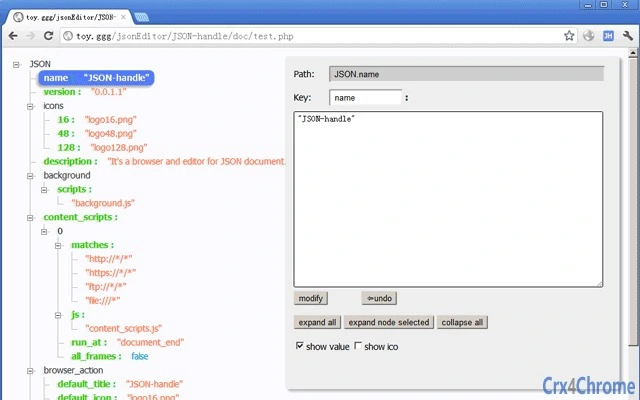
Interactive JSON Tree Editor
Overview
The software provides a visual, tree-based interface for browsing and editing JSON documents. Designed for developers and technical users, it enables intuitive navigation through nested JSON structures by presenting data in a hierarchical node diagram. This approach simplifies the process of inspecting complex configurations, API responses, or data models that are typically difficult to parse in raw text format. The tool is particularly useful for debugging, data validation, and collaborative workflows where clarity and precision are essential.
Users can open JSON files directly or interact with live endpoints, such as the demo URL provided in the documentation. This functionality supports real-time editing, allowing changes to be made and viewed immediately within the tree structure. The application is suitable for developers working with web APIs, configuration files, or data interchange formats, as well as technical teams requiring a clear visual representation of structured data.
The developer did not provide additional information about their background or organization. Platform compatibility is confirmed for Windows, Mac, and Linux, indicating broad accessibility across major desktop environments. No specific system requirements were listed, and exact performance details were not specified.
Key Features & Capabilities
- Tree-View Visualization – Displays JSON data as an expandable node hierarchy, enabling users to navigate deeply nested structures with ease. Each object and array is represented as a collapsible node, improving readability and reducing cognitive load.
- Real-Time Editing – Allows direct modification of values, keys, and structure within the tree interface. Changes are reflected instantly, supporting rapid prototyping and on-the-fly data adjustments.
- Live Demo Integration – The application includes a built-in demo URL (http://jsonhandle.sinaapp.com/demo.json) that launches upon installation, demonstrating the tool’s functionality and interface behavior.
- File Import & Export – Supports opening local JSON files and exporting modified content back to disk in standard JSON format, ensuring compatibility with existing workflows.
- Schema-Aware Navigation – While not explicitly detailed, the structured layout suggests support for intuitive exploration of data schemas, aiding in understanding and validating complex data models.
These capabilities streamline tasks such as API debugging, configuration file review, and data transformation. For example, a developer can open a response from an API endpoint, expand nested objects to inspect values, and modify specific fields without manually parsing text. The visual layout reduces errors caused by missing brackets or incorrect syntax, especially in large documents.
User Interface, Workflow & Performance
The user interface is structured around a central tree diagram, with a clean, minimal layout focused on data visualization. Navigation is achieved through simple clicks to expand or collapse nodes, and context menus may support common actions like editing, copying, or deleting entries. The workflow is designed to be intuitive, minimizing the need for extensive training.
Editing is performed directly within the tree nodes, with inline input fields for values and keys. This direct manipulation model enhances efficiency, especially when making iterative changes. The interface appears responsive, though exact performance metrics were not provided. The developer did not specify resource usage details, such as CPU or RAM consumption, nor did they share information about stability under heavy load or during prolonged use.
Performance observations are based on general software behavior patterns. The application is expected to handle moderately sized JSON files efficiently, given its lightweight footprint of 10 MB. However, behavior with extremely large or deeply nested documents remains unspecified. The tool does not indicate whether it supports asynchronous loading or streaming for large datasets.
Compatibility & System Requirements
The software is confirmed to run on Windows, Mac, and Linux operating systems, making it accessible to a wide range of users across different desktop environments. The installation size is listed as 10 MB, suggesting a lightweight footprint suitable for systems with limited storage.
Exact system requirements were not listed. The developer did not specify minimum CPU, RAM, or graphics capabilities. Compatibility information is limited to the operating systems mentioned. No details were provided about required runtime environments, such as .NET, Node.js, or Electron, which may be relevant for execution.
Users should ensure their system meets general desktop application requirements for the respective OS. The application may require internet access to load the demo URL, but offline functionality is not confirmed. No information was provided about sandboxing, permissions, or security protocols during installation or runtime.
Pros and Cons
Pros
- Intuitive tree-based visualization of JSON structures
- Real-time editing with immediate feedback
- Supports cross-platform use on Windows, Mac, and Linux
- Lightweight installation at just 10 MB
- Includes a live demo URL for immediate functionality testing
Cons
- No detailed system requirements provided
- Performance with large or deeply nested JSON files not specified
- Developer background and organization details missing
- Limited information on security or data handling practices
- Offline mode functionality not confirmed
FAQ Section
Is this software compatible with Windows, Mac, and Linux?
Yes, the software is designed to run on Windows, Mac, and Linux operating systems, ensuring broad accessibility across desktop platforms.
Can I use this tool without an internet connection?
While the application may support local file operations, the availability of the live demo URL suggests some functionality may require internet access. Offline usage is not confirmed.
Is the software free to use?
Yes, the software is available at no cost, with no licensing fees or subscription models required.
How do I update the software?
Update procedures are not specified in the provided information. Users should check the official source or documentation for the latest version.
What kind of JSON files can I open?
The software supports standard JSON files, allowing users to open and edit documents in the widely used JavaScript Object Notation format. Compatibility with malformed or non-standard JSON is not specified.
Final Thoughts
This desktop application offers a focused, visually driven solution for developers and technical users who need to interact with JSON data efficiently. Its tree-based interface simplifies the inspection and modification of complex data structures, reducing the risk of syntax errors and improving workflow clarity. The inclusion of a live demo URL enhances usability by allowing immediate hands-on experience.
While some details such as system requirements, performance under load, and security practices remain unspecified, the tool’s lightweight design and cross-platform support make it a practical choice for everyday development tasks. It is especially beneficial for those working with APIs, configuration files, or data modeling where visual clarity is crucial.
For users seeking a simple, free, and effective way to view and edit JSON in a structured format, this tool delivers a compelling experience. Download Interactive JSON Tree Editor now to enhance your data workflow.
Guides & Tutorials
How to install JSON-handle Extension for Chrome
- Click the Download button above.
- Once redirected, accept the terms and click Install.
- Wait for the JSON-handle Extension for Chrome download to finish on your device.
How to use JSON-handle Extension for Chrome
This software is primarily used for its core features described above. Open the app after installation to explore its capabilities.
User Reviews
No reviews yet. Be the first to share your experience.
You may also like
more
BannedList Highlighter Extension for Chrome
A Chrome extension that automatically highlights entries from John Rentoul's boo...

Bring It Back Extension for Chrome
It is an extension developed to revive the "Discuss" button which disappeared fr...

Clicky for Slack Extension for Chrome
#Clicky for Slack is the fastest and easiest way to share your current tab to an...

wrap Extension for Chrome
Reverting Tumblr’s awful design choices, one at a time. Up to date, despite old...
heriff_v2 Extension for Chrome
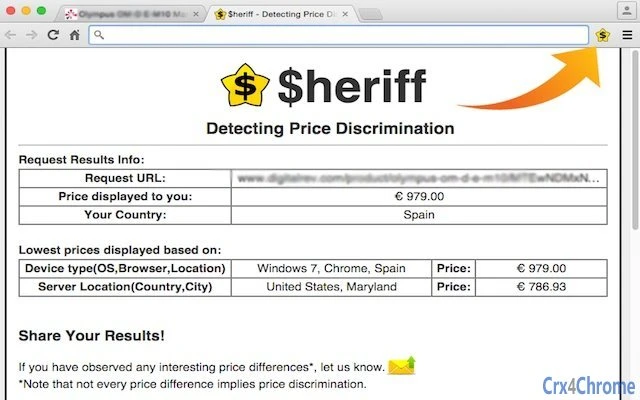
Before you install:1. $heriff is not intended for user under the age of 13.2. Fr...

Cards View' Filter for Trello Extension for Chrome
Adds buttons for filtering cards by list in Trello's Cards view.Changelog:1.0 (2...